Sim Commander Software Documentation
Completed
How To Disable Voice Control
3217 Views •How To Map Voice Command Button
3602 Views •How To Set Speech Language
3025 Views •How To Uninstall License
3380 Views •How To Stay Connected To iRacing
4019 Views •How To Filter Profile List
3449 Views •How To Auto Tune From Lap
3727 Views •How To Fully Reset A Game To Defaults
3564 Views •How To Reset Profile To Defaults
3806 Views •Sim Commander Heads Up Display (HUD) Gauge Tutorial
4927 Views •How To Auto Discover Games/Profiles
4119 Views •How Do I Use Cloud Tuning?
4500 Views •Game Specific Configuration
6222 Views •How To Remove Cloud Tuning In A Profile
2970 Views •Understanding Configuration Warnings
3964 Views •How To Add Games That Weren't Detected
5125 Views •Managing Games In Sim Commander
7453 Views •How To Reset a Profile To Default Settings
4729 Views •Sim Commander 4.5 Quick Start Guide
33607 Views •Sim Commander API / SDK - Open Game Telemetry
10472 Views •Managing Games In Sim Commander
7453 Views •Game Specific Configuration
6222 Views •Sim Commander Tuning Quick Start Guide
5251 Views •How To Add Games That Weren't Detected
5125 Views •Launching Games in VR
5039 Views •Sim Commander Heads Up Display (HUD) Gauge Tutorial
4927 Views •How To Reset a Profile To Default Settings
4729 Views •How Do I Use Cloud Tuning?
4500 Views •SimXperience Driver Installation
4414 Views •Compatibility With Other Hardware & Software
4404 Views •What Does Cloud Tuning Do?
4193 Views •How To Auto Discover Games/Profiles
4119 Views •How To Stay Connected To iRacing
4019 Views •Understanding Configuration Warnings
3964 Views •Manually Restore Sim Commander Settings From Backup
3902 Views •Conditional Effect Group Intro
3812 Views •How To Reset Profile To Defaults
3806 Views •How To Auto Tune From Lap
3727 Views •Game Specific Configuration
Automatic Configuration
When you launch a game from Sim Commander, we make every effort to automatically configure the game settings to function correctly with Sim Commander. Most of the time you need to do nothing other than launch a game from the Sim Commander main screen.
Games Requiring Special Configuration
A few games have inaccessible or encrypted settings files making automatic configuration impossible. The list below describes how to manually configure these games to operate with Sim Commander.
Due to Automobilista saving the shared memory setting in an encrypted file, we are unable to simplify your experience by altering this setting automatically.
To set this manually:
Click 'Options' from the main menu
Select 'System'
Use the arrows to set shared memory to "Project CARS 2" format.
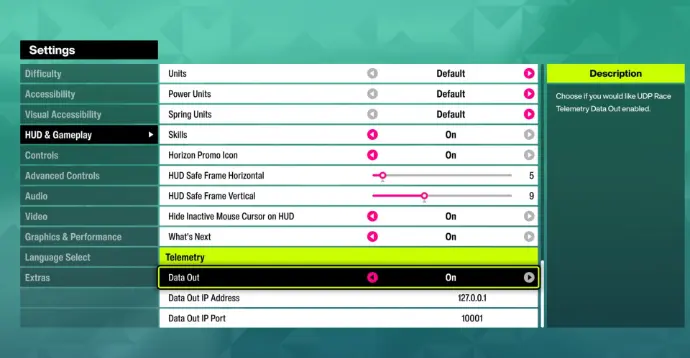
From the Forza main menu, click Settings
From the Forza settings menu, click HUD and Gameplay
Scroll down the settings list until you see the 'Data Out' option
Set Data Out to 'ON'
Set Data Out IP Address to 127.0.0.1
Set Data Out IP Port to 10001
Set Data Out to 'ON'
Set Data Out IP Address to 127.0.0.1
Set Data Out IP Port to 10001
Set Data Out to 'ON'
Set Data Out IP Address to 127.0.0.1
Set Data Out IP Port to 10001
Set Data Out Packet Format to Car Dash
From the main menu click settings
Scroll over to the System tab
Set the Shared Memory setting to Project CARS 2
NOTE: Sim Commander uses shared memory, not UDP for this game so unless you have another software that needs UDP data from PCARS3, you can turn UDP Mode off to improve performance.
Game specific settings needed to operate with Sim Commander
Commenting is not enabled on this course.