Sim Commander Software Documentation
Completed
How To Disable Voice Control
4271 Views •How To Map Voice Command Button
4847 Views •How To Set Speech Language
4034 Views •How To Uninstall License
4436 Views •How To Stay Connected To iRacing
5586 Views •How To Filter Profile List
4681 Views •How To Auto Tune From Lap
4971 Views •How To Fully Reset A Game To Defaults
4702 Views •How To Reset Profile To Defaults
5137 Views •Sim Commander Heads Up Display (HUD) Gauge Tutorial
6666 Views •How To Auto Discover Games/Profiles
5390 Views •How Do I Use Cloud Tuning?
5945 Views •Game Specific Configuration
9196 Views •How To Remove Cloud Tuning In A Profile
4038 Views •Understanding Configuration Warnings
5515 Views •How To Add Games That Weren't Detected
6939 Views •Managing Games In Sim Commander
10159 Views •How To Reset a Profile To Default Settings
8348 Views •Sim Commander 4.5 Quick Start Guide
47488 Views •Sim Commander API / SDK - Open Game Telemetry
14552 Views •Managing Games In Sim Commander
10159 Views •Game Specific Configuration
9196 Views •How To Reset a Profile To Default Settings
8348 Views •Launching Games in VR
7000 Views •How To Add Games That Weren't Detected
6939 Views •Sim Commander Tuning Quick Start Guide
6870 Views •Sim Commander Heads Up Display (HUD) Gauge Tutorial
6666 Views •Compatibility With Other Hardware & Software
6513 Views •How Do I Use Cloud Tuning?
5945 Views •SimXperience Driver Installation
5829 Views •What Does Cloud Tuning Do?
5786 Views •How To Stay Connected To iRacing
5586 Views •Manually Restore Sim Commander Settings From Backup
5534 Views •Understanding Configuration Warnings
5515 Views •How To Auto Discover Games/Profiles
5390 Views •How To Reset Profile To Defaults
5137 Views •Conditional Effect Group Intro
4978 Views •How To Auto Tune From Lap
4971 Views •Game Specific Configuration
Automatic Configuration
When you launch a game from Sim Commander, we make every effort to automatically configure the game settings to function correctly with Sim Commander. Most of the time you need to do nothing other than launch a game from the Sim Commander main screen.
Games Requiring Special Configuration
A few games have inaccessible or encrypted settings files making automatic configuration impossible. The list below describes how to manually configure these games to operate with Sim Commander.
Due to Automobilista saving the shared memory setting in an encrypted file, we are unable to simplify your experience by altering this setting automatically.
To set this manually:
- Click 'Options' from the main menu
- Select 'System'
- Use the arrows to set shared memory to "Project CARS 2" format.
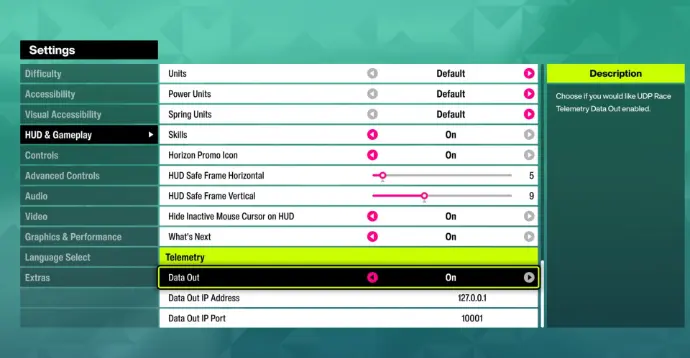
- From the Forza main menu, click Settings
- From the Forza settings menu, click HUD and Gameplay
- Scroll down the settings list until you see the 'Data Out' option
- Set Data Out to 'ON'
- Set Data Out IP Address to 127.0.0.1
- Set Data Out IP Port to 10001
- Set Data Out to 'ON'
- Set Data Out IP Address to 127.0.0.1
- Set Data Out IP Port to 10001
- Set Data Out to 'ON'
- Set Data Out IP Address to 127.0.0.1
- Set Data Out IP Port to 10001
- Set Data Out Packet Format to Car Dash
- From the main menu click settings
- Scroll over to the System tab
- Set the Shared Memory setting to Project CARS 2
NOTE: Sim Commander uses shared memory, not UDP for this game so unless you have another software that needs UDP data from PCARS3, you can turn UDP Mode off to improve performance.
Game specific settings needed to operate with Sim Commander
Commenting is not enabled on this course.